

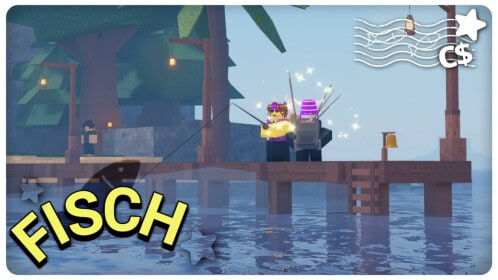
In the Roblox community, a Fisch script refers to a custom Lua-based automation script designed to enhance or manipulate gameplay in specific Roblox experiences, most notably in fishing-themed games like Fisch or similar simulators. These scripts are widely shared in the form of copy-paste loadstrings that offer features like auto-farming, teleporting, auto-selling, and more—all with the intent of giving players an advantage.
While many players are curious about Fisch scripts, it’s important to understand both their functionality and the risks involved. This 2025 guide breaks down what Fisch scripts do, provides a large collection of popular examples, and helps you use scripting responsibly and safely.
What Fisch Scripts Typically Do
Fisch scripts are built using Lua and injected via Roblox exploit tools (called executors). They typically provide:
- Auto-Farm / Auto Fish – Automatically catch fish or collect resources
- Auto Sell – Sell items instantly without interaction
- Teleportation – Instantly travel between islands, NPCs, or shop areas
- ESP/Visuals – Show rare fish locations or item spawns
- Mobile-Friendly GUIs – Simple interfaces for toggling features
- Anti-AFK – Prevent being kicked for idling
Popular Fisch Scripts (Keyless Loadstrings – 2025)
Here are widely used, no-key Fisch script examples. You can paste them into your executor and run them directly in-game. (Note: These are for informational and educational use only.)
⚙️ Fisch Script – Auto Farm + Auto Sell
luaCopyEditloadstring(game:HttpGet("https://raw.githubusercontent.com/hakariqScripts/disch2/refs/heads/main/disch%20script"))()
⚙️ Fisch Script – Full Autofarm GUI
luaCopyEditloadstring(game:HttpGet("https://github.com/Synergy-Networks/products/raw/main/Rift/loader.lua"))()
⚙️ Fisch Script – Ronix Hub GUI (No Key)
loadstring(game:HttpGet("https://api.luarmor.net/files/v3/loaders/a3c501e721ec4d66a864cc2276c0f4e9.lua"))()
⚙️ Fisch Script – Speed Hub X v5.2.4
loadstring(game:HttpGet("https://raw.githubusercontent.com/AhmadV99/Speed-Hub-X/main/Speed%20Hub%20X.lua", true))()
⚙️ Fisch Script – Moon X GUI (Mobile Compatible)
loadstring(game:HttpGet("https://api.luarmor.net/files/v3/loaders/cba17b913ee63c7bfdbb9301e2d87c8b.lua"))()
⚙️ Fisch Script – YHUB (Full Features GUI)
loadstring(game:HttpGet("https://yhub.cloud/scripts/yhub.lua"))()
⚙️ Fisch Script – Lunor GUI (Lightweight Interface)
loadstring(game:HttpGet("https://lunor.dev/scripts/fisch-autofarm.lua"))()
⚙️ Fisch Script – Banana Cat Hub (Requires Key)
getgenv().Key = "PASTE_YOUR_KEY_HERE"
loadstring(game:HttpGet("https://raw.githubusercontent.com/obiiyeuem/vthangsitink/main/BananaHub.lua"))()
If any script doesn’t load, make sure the executor is updated, and check if the game has patched recent script methods.
The Risks of Using Fisch Scripts
Before using any script, you should be aware of the significant risks involved, especially in public Roblox games.
🚫 Dangers Include:
- Account Bans – Roblox has anti-cheat detection; using third-party tools can get your account permanently banned.
- Malware & Viruses – Many scripts or executors are laced with harmful software.
- Unfair Gameplay – These scripts disrupt normal gameplay, giving unfair advantages over other players.
- Violation of Roblox Terms – Using scripts in public or multiplayer games is strictly against Roblox’s TOS.
Safe & Ethical Alternatives for Scripting Enthusiasts
If you’re interested in scripting for fun, learning Lua, or automating actions for personal use, there are safe ways to enjoy scripting without breaking the rules.
🧪 Use Roblox Studio
You can build your own autofarm or GUI using Roblox Studio, which is 100% allowed and a great way to learn real scripting.
Example – Safe Autofarm in Studio:
-- Simple auto-clicker loop for testing in your own game
while wait(0.5) do
    print("Auto-action running...")
    -- Insert your game logic here, such as adding coins
end
🎓 Recommended Learning Path:
- Learn Roblox Lua through tutorials
- Use LocalScripts in StarterPlayerScripts
- Practice in private servers or sandbox games
- Create toggle GUIs and custom UIs using
ScreenGui
Tips for Script Safety
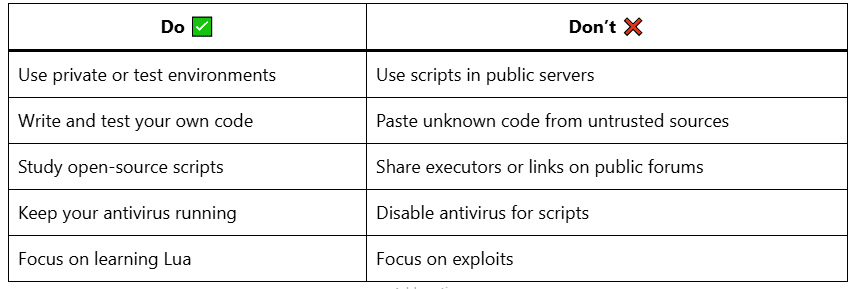
Fisch scripts offer flashy features like auto-farming and GUI toggles, but the risks of public use far outweigh the rewards. If you’re genuinely interested in scripting or automation, explore Roblox Studio, build something of your own, and stay within the platform’s community standards.
Curious to build your own autofarm GUI with buttons? I can give you a template that’s safe and fully editable in Roblox Studio. Just ask!Ask ChatGPT