

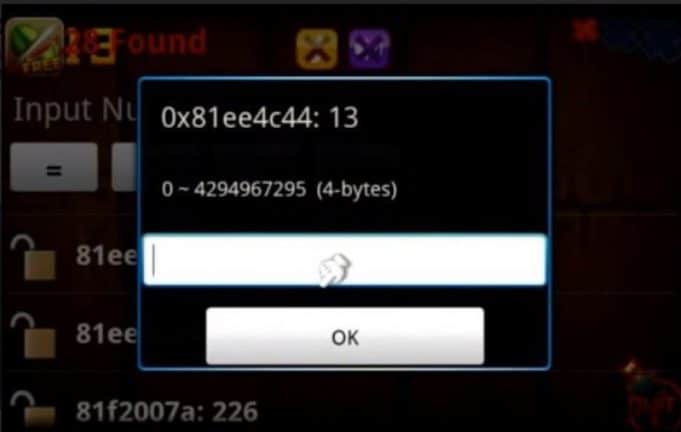
If you’ve ever used Cheat Engine, you know it’s a powerful memory scanner and editor designed to let users tweak values in PC games—think unlimited money, invincibility, or faster movement. It’s especially useful for offline or single-player games where modding the experience can make it more enjoyable or customizable.
But Cheat Engine isn’t the only tool of its kind. Whether you’re looking for a more user-friendly interface, enhanced features, or tools built for specific platforms like Linux or Mac, this 2025 guide will walk you through the best Cheat Engine alternatives—both free and paid—tailored for game hacking, memory editing, or debugging.
Note: These tools should only be used in offline or single-player games. Using memory editors in online or multiplayer environments is unethical, often against terms of service, and may result in bans.
What Is Cheat Engine?
Cheat Engine is a free and open-source memory scanner for Windows that allows users to:
- Scan and modify in-game values (e.g., HP, gold, experience)
- Speed up or slow down gameplay
- Create custom trainers and cheats
- Debug processes for game hacking or mod development
Though powerful, Cheat Engine can be overwhelming for beginners and may trigger false positives in antivirus software.
7 Best Cheat Engine Alternatives for PC in 2025
Here are the top tools you can use as a Cheat Engine substitute based on features, usability, and community support.
1. WeMod
Platform: Windows
Type: Beginner-friendly trainer platform
Price: Free (Premium version available)
Core Features:
- One-click game modding for 2,000+ titles
- No manual memory scanning—uses pre-made trainers
- Sleek, modern interface
- Safe and regularly updated
Pros:
- Extremely easy to use
- No need to search memory addresses manually
- Large and active community
- Works with many popular single-player games
Cons:
- Limited to supported games
- Requires internet connection
- Premium subscription unlocks features like remote control
Best For: Casual gamers looking to mod popular games without coding or manual memory editing.
2. ArtMoney
Platform: Windows
Type: Memory scanner and editor
Price: Free / Pro version available
Core Features:
- Scan and edit numeric values in memory
- Hex editing and filtering options
- Supports older and newer PC games
- Less likely to be flagged as malware
Pros:
- Lightweight and effective
- Ideal for classic or retro games
- Easier interface than Cheat Engine
Cons:
- Less powerful than Cheat Engine for complex scripts
- No built-in trainer creation tools in free version
Best For: Fans of older offline games looking for a stable and lightweight tool.
3. CoSMOS (by Cheat Happens)
Platform: Windows
Type: Memory scanner and trainer creator
Price: Free / Pro version for Cheat Happens members
Core Features:
- Fast memory scanning
- Built-in scripting system
- Trainer-building mode
- Clean, user-friendly UI
Pros:
- Backed by Cheat Happens’ large trainer library
- Pro version offers advanced debugging
- Built-in protection from game crashes
Cons:
- Free version is limited in features
- Some tools locked behind a subscription
Best For: Intermediate to advanced users who want to build and share trainers.
4. GameConqueror (Part of scanmem)
Platform: Linux
Type: Open-source memory editor
Price: Free
Core Features:
- CLI-based
scanmembackend with a GUI frontend - Works like Cheat Engine but for Linux
- Supports memory scanning, editing, and freezing values
Pros:
- Native Linux support
- Fully open-source
- Great for debugging and learning game memory structures
Cons:
- Less polished interface
- Requires Linux knowledge and CLI comfort
Best For: Linux gamers and developers looking to modify single-player titles natively.
5. PINCE
Platform: Linux (also compatible with Android via Termux)
Type: Debugger and memory editor
Price: Free (Open-source)
Core Features:
- Similar to Cheat Engine with GUI and debugging tools
- Uses GDB for backend processing
- Advanced tracing and injection features
Pros:
- Powerful for reverse engineering
- Customizable and extensible
- Open-source with community support
Cons:
- Complex for beginners
- Requires GDB familiarity
Best For: Power users and game hackers on Linux or Android.
6. Squalr
Platform: Windows
Type: Memory editor and debugger
Price: Free
Core Features:
- Real-time memory scanning
- Multi-threaded performance
- Built-in scripting system with C#
- Cheat table support
Pros:
- Fast scan speeds
- Modern UI
- Open-source with dev updates
Cons:
- Smaller user base
- Still evolving with occasional bugs
Best For: Developers or advanced gamers who want an open-source alternative to Cheat Engine.
7. L. Spiro’s Memory Hacking Software (MHS)
Platform: Windows
Type: Advanced memory editor/debugger
Price: Free
Core Features:
- Memory searching, scripting, and breakpoints
- Plugin support
- Visual disassembler and debugger
Pros:
- Robust tool for deep game analysis
- Can handle complex cheat creation
Cons:
- Steeper learning curve
- Outdated interface
Best For: Experienced hackers and programmers working on complex single-player games.
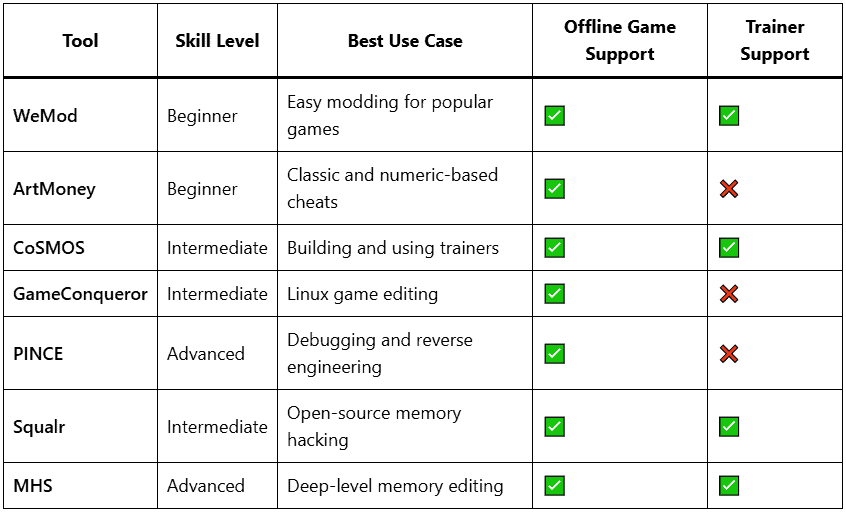
Which Tool Should You Choose?
Play Ethically and Responsibly
Memory editors and cheat tools like the ones listed above are powerful—but with great power comes great responsibility. Always use these tools ethically, especially in offline or single-player settings, and never in multiplayer games where cheating ruins the experience for others.
Whether you’re a casual player wanting infinite cookies or a developer exploring game structures, there’s a tool here for every level and platform in 2025.